
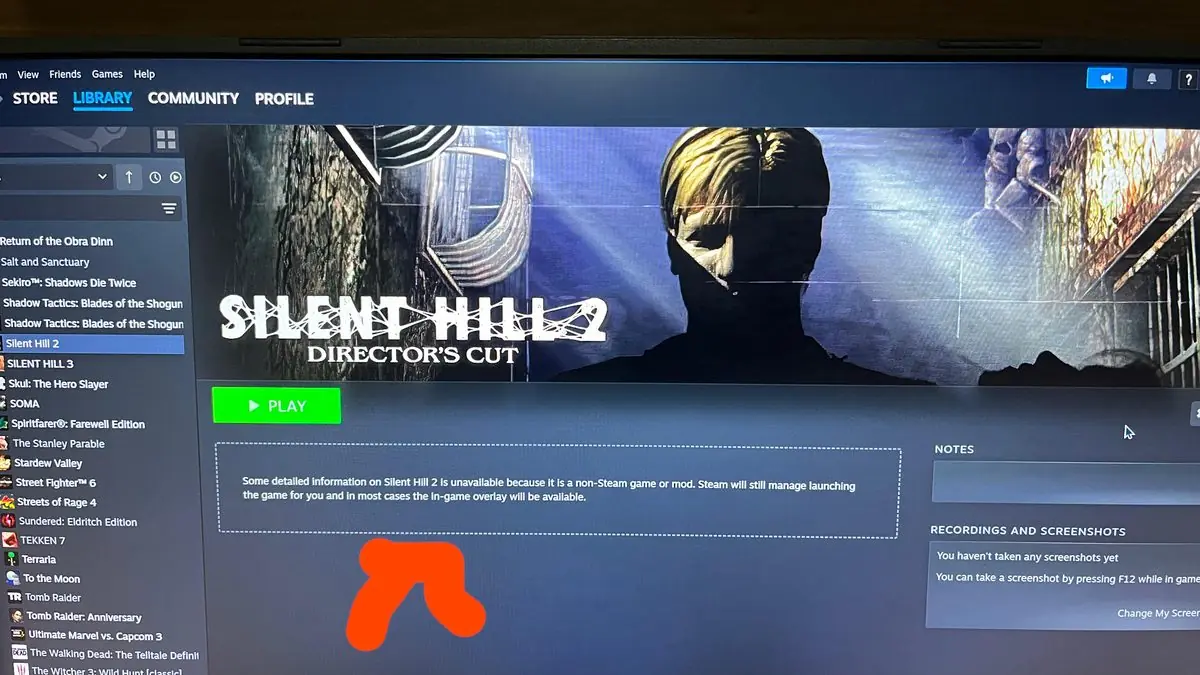
Steam‘s interface has evolved a lot over the years, but one area that still leaves some players wanting more control is how non-Steam games appear in their libraries.
A recent question on the Steam subreddit perfectly captures this frustration. One user simply asked if there’s a way to get rid of the info boxes that appear for non-Steam games.
“Can I get rid of non-steam game info box feom non-steam games?” – u/CHNSK on r/Steam
It’s a straightforward question that gets at something bigger. When we add external games to Steam, we want them to feel integrated. But sometimes the interface elements that work for Steam games don’t feel right for everything else.
Steam’s non-Steam games feature has been around for years. It lets us add any game or program to our Steam library, giving us that unified launcher experience we all love. We can launch everything from one place, use Steam’s overlay, and even stream non-Steam games to other devices.
But the feature has always felt a bit like an afterthought. The info boxes show details that might not make sense for external games. Some of us might prefer a cleaner look without all the extra UI elements cluttering up our library view.
This isn’t just about one person’s preference. We’ve seen similar requests pop up in Steam forums and communities over the years. People want more control over how their library looks and feels. Some want to hide certain elements, others want to customize them completely.
The desire for interface customization runs deep in the PC gaming community. We love tweaking our setups, from hardware to software. Steam has given us some customization options over the years – different library views, custom artwork, collections and categories. But there’s always room for more.
When we think about why this matters, it comes down to the personal connection we have with our game libraries. These aren’t just lists of software – they’re collections that represent hundreds of hours of our time and experiences. We want them to look and feel exactly right.
Steam has been pretty good about listening to community feedback on interface improvements. The recent library redesign came after years of user requests. Big Picture mode, family sharing, and remote play all started as community wishlist items that Valve eventually implemented.
The company has also been expanding Steam’s reach beyond just Valve’s store. Steam Deck support, better controller integration, and improved non-Steam game handling all show they understand we don’t live in a Steam-only ecosystem.
For interface customization specifically, we’ve seen gradual improvements. The ability to set custom artwork for any game was huge. Being able to organize games into collections made library management much easier. These features show Valve gets that personalization matters to us.
Looking ahead, there are several ways Steam could give us more control over the non-Steam game experience. Simple toggle switches to hide or show specific UI elements would be a great start. More granular artwork customization could help external games blend better with Steam titles.
Advanced users might appreciate even deeper customization options. Think custom CSS-style controls for library appearance, or the ability to create different view modes for different types of games.
Valve has been working on Steam’s user interface more actively in recent years. The Steam Deck’s gaming mode required a complete rethink of how Steam’s UI works with different input methods and screen sizes. That work has been flowing back into the desktop client too.
We might not see dramatic changes overnight, but the trend seems positive. Steam keeps evolving to better serve how we actually use it, not just how Valve originally imagined we would.
For now, players asking questions like this one are part of an important conversation. Every feature request, forum post, and Reddit question helps Valve understand what we need from Steam’s interface.
The non-Steam games feature might seem like a small part of Steam’s overall functionality, but for many of us, it’s essential. As game libraries get bigger and more diverse, having better tools to organize and customize them becomes increasingly important.
Whether Valve will add more granular control over non-Steam game presentation remains to be seen. But if past updates are any indication, community feedback like this tends to eventually find its way into Steam updates. The question is just when, not if.