Picture this: your Steam library is like a sprawling space station, and you’re the commander trying to make sense of hundreds of digital worlds floating in the void. Sound familiar? One genius gamer just shared their master plan for bringing order to the chaos, and it’s spreading through the PC gaming community like wildfire.
Meet the hero we didn’t know we needed. They’ve cracked the code on Steam library organization with a nine-category system that feels like something straight out of a sci-fi logistics manual. It’s practical, it’s brilliant, and it’s making other gamers realize they’ve been living in digital anarchy.
“How do you organize your Steam library?
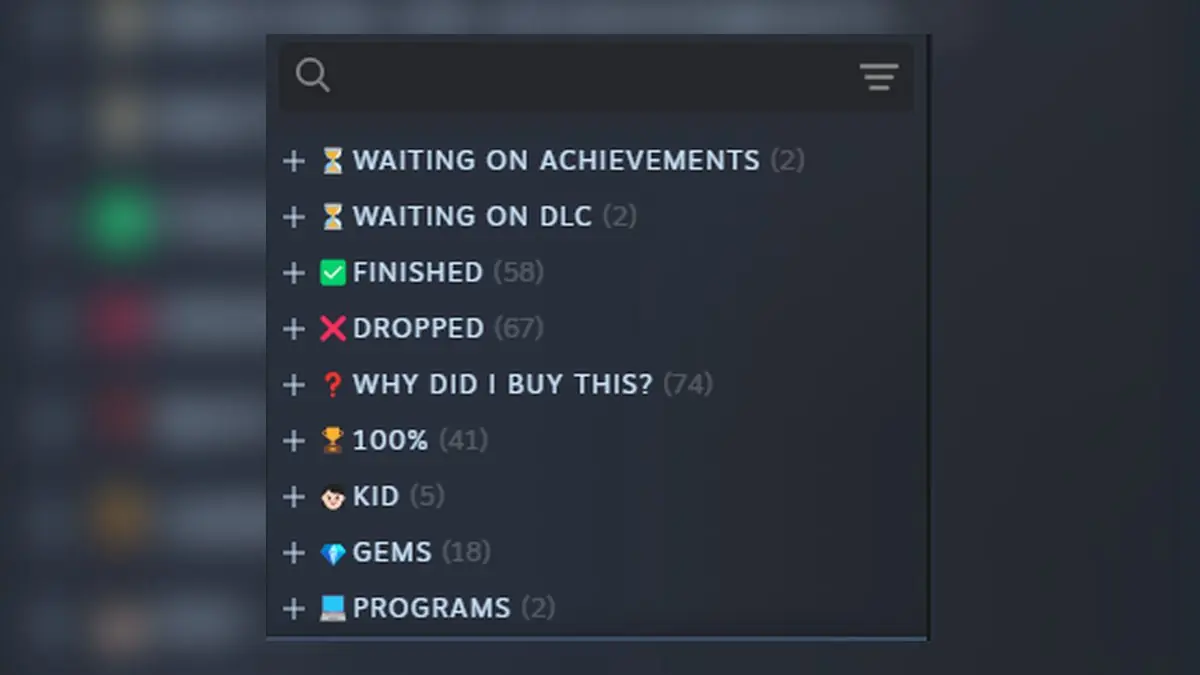
My structure:
- Waiting for Achievements (keeping an eye on updates for games I want to replay)
- Waiting for DLCs
- Finished = Beaten, but not 100%
- Droppoed = Dropped halfway (didn’t like it, got tired, bored, or lost interest)
- Why did i buy this? = Regretted purchases (don’t know why I bought these, waste of money)
- 100% = 100% Completed
- Kid = Games for my kid
- Gems = All-time Masterpieces
- Programs = (ShareX, Wallpaper Engine)” — u/Ingword on r/Steam
This isn’t just organization — it’s digital archaeology. The system tracks every stage of a game’s lifecycle in your library, from that impulse buy during a Steam sale to the moment it becomes a treasured classic. The “Why did I buy this?” category alone deserves a medal for honesty.
What makes this system pure genius is how it handles the messy reality of modern gaming. The “Waiting for Achievements” category? That’s for games getting post-launch updates that add new trophies to hunt. “Waiting for DLCs” captures those incomplete stories we’re dying to finish. It’s like having a mission control center for your gaming future.
The “Dropped” category hits different too. We’ve all got those games that seemed amazing in trailers but just didn’t click. No shame in that — sometimes you need to admit when a game isn’t your vibe and move on. This system gives you permission to be honest about your gaming journey.
But here’s the really smart part: mixing personal gaming with family stuff and even non-game programs. The “Kid” category shows how PC gaming has evolved into a multi-generational experience. And throwing ShareX and Wallpaper Engine into a “Programs” category? That’s next-level thinking about what Steam has become.
This organization method reflects something bigger happening in PC gaming. We’ve moved from having maybe a dozen games to owning hundreds or thousands. Steam sales, Humble Bundles, and subscription services have turned us all into digital hoarders. Without a system like this, finding anything becomes like searching for a specific star in a galaxy.
The beauty is in the categories themselves. “Gems” for those all-time masterpieces that changed your life. “100%” for the completionist victories. “Finished” for games you loved but don’t need to perfect. Each category tells a story about how we actually play games versus how we think we play them.
It’s also weirdly honest about the psychology of game buying. That “Why did I buy this?” category? Every Steam user knows that feeling. We’ve all bought games during sales that seemed like good deals but never actually played them. Having a category for buyer’s remorse is therapeutic.
Looking ahead, this kind of organization will become even more important. Game libraries are only getting bigger, and new platforms keep launching. Epic Games Store, Game Pass, PlayStation Plus — we’re drowning in choice. Systems like this might be the only way to stay sane.
The real test will be maintaining it. Creating categories is easy, but keeping games properly sorted as you play them? That takes discipline. But for the organized gamers out there, this system offers something that feels like bringing order to the universe — one Steam library at a time.